Pharmacy and medicine shop POS
Pharmacy POS Software with Batch, Expiry and Generic Name Search
GPOS Pharmacy POS Software is billing and stock software for pharmacies and medicine shops. Type a generic name to see every brand and the nearest expiry, sell by the tablet, strip or box, and attach the prescription photo to the bill. The counter keeps billing when the internet drops.
We are working
with the world’s biggest brands


Pharmacy Definition
What is pharmacy POS software?
Pharmacy POS software is the billing and stock system a medicine shop runs on: it sells by the tablet, strip or box, tracks every batch and expiry date, and keeps a record of what each patient bought.
GPOS Pharmacy POS Software adds generic-name search, first-expiry-first-out stock and batch recall, and the counter keeps billing when the internet drops.
-
Search by generic name
Type the generic name and every brand that carries it comes up, with the batch that expires first.
-
Tablet, strip or box
Sell one tablet, a full strip or a sealed box from the same stock, and the count stays right in every unit.
-
Batch recall
When a supplier withdraws a batch, GPOS shows where that batch sits in your stock so you can take it off sale.
-
Want to see it with your own medicine list?
Talk to an expert
Pharmacy 6 features
What a pharmacy counter
checks before every sale
Beyond billing and stock, these are the checks a pharmacy relies on at the counter: the oldest batch first, expired strips kept off sale, ID and dose limits on controlled medicines, interaction warnings, refill reminders and a counter that works through internet cuts.
-
Oldest batch goes out first
If the same medicine arrives in several batches, the counter draws from the earliest batch first, so a newer delivery never pushes an older one past its expiry date on the shelf.
-
Expired strips taken off sale
Once a batch passes its expiry date, GPOS removes it from sale automatically, and a filterable expiry report shows what to pull and dispose of. See how to manage expired products.
-
Photo ID and dose limits on restricted drugs
Selling a controlled medicine asks for a prescription check and a photo of the buyer's ID, holds the sale to dosage and quantity limits, and adds it to a controlled-drug log you can show inspectors.
-
A warning when two medicines clash
GPOS keeps each patient's medication history and shows a drug interaction warning at the counter, so the pharmacist can stop and ask questions before anything is handed over.
-
Refill reminders by SMS or email
GPOS can send a patient an SMS or email when their next refill is due, so people on regular medicine come back to your pharmacy before they run out.
-
Keep billing when the internet drops
GPOS Pharmacy POS works in the cloud, but its offline mode keeps the counter selling during internet downtime, so a patient is not sent away because the connection is down.
-

Medicine Expiry
& Batch TrackingTrack medicines by batch numbers and expiration dates to avoid selling expired products. The system notifies staff of upcoming expirations and generates reports for safe stock disposal. It ensures legal compliance and patient safety while reducing financial loss from expired inventory.
- Batch-wise inventory tracking
- Expiry notifications
- Auto-removal of expired stock
- Filterable expiry report
- FIFO (First-In-First-Out) stock logic
-

Controlled
Substance Sales MonitoringEnsure regulatory compliance with real-time logging and alerts when selling controlled or restricted medicines. The POS tracks ID verifications, dosage limits, and prescription authenticity, helping prevent misuse and ensuring proper recordkeeping for inspections and audits.
- ID verification with photo capture
- Controlled drug sale log
- Dosage and quantity restrictions
- Mandatory prescription check
- Real-time compliance alerts
-

Prescription
Management IntegrationThis feature allows pharmacies to directly manage and track customer prescriptions within the POS. It reduces human error, speeds up service, and ensures compliance with medical regulations. The system stores patient history, dosage instructions, refill schedules, and flags drug interactions automatically.
- Digital prescription uploads and scanning
- Automated refill alerts
- Patient medication history tracking
- Drug interaction warnings
- Doctor and pharmacy communication log

One platform, every module
Pharmacy POS Modules from Supplier to Patient
Generic search at the counter, batch and expiry in stock, and a prescription saved with every bill: these modules take a pharmacy from the distributor's invoice to the patient's receipt.
-
Buy & make
Purchases and production
-
Stock
Every shelf and warehouse
-
Sell
At the counter and on invoice
-
Get paid
Customers, dues and books
-
Grow
Staff, messages and branches

1 · Buy & make
BackOffice
Purchases from medicine companies and distributors, with dues.
- Purchase orders to each distributor
- Near-expiry stock returned to suppliers
- Company-wise supplier ledgers
- Separate pharmacist and cashier roles

1 · Buy & make
Manufacturing
Assemble first-aid kits from items you already stock.
- A bill of materials for each first-aid kit
- Bandages and items drawn from stock
- Finished kits ready on the shelf
- Alert quantities for kit supplies

2 · Stock
Inventory
Batch, expiry and pack size for every medicine.
- Stock exact to the tablet
- First-expiry, first-out selling
- Expired stock warned or blocked
- Batch recall across every shelf
2 · Stock
Multi Warehouse
A central medicine store and the shelves it feeds.
- Central store kept apart from outlets
- Rack and shelf for every medicine
- Transfers from the store to each counter
- Outlets confirm the cartons they receive

3 · Sell
Sales
Bills, returns and invoices for patients and clinics.
- Patient receipts or A4 clinic invoices
- Returned medicine put back in stock
- Mushak-6.3 VAT invoices
- Sold medicines and returns reports

3 · Sell
POS (Point of Sale)
A medicine counter that finds every brand by its generic.
- Generic name search with every brand
- Sell by tablet, strip or box
- Nearest expiry shown as you search
- Keeps selling when the internet is down

3 · Sell
Order & Quotation
Medicine orders confirmed, invoiced and delivered.
- Quotations for clinics and hospitals
- Repeat orders kept as drafts
- Invoices made as medicines are packed
- Home delivery by courier, with tracking

3 · Sell
Services
Warranty and repairs for the medical devices you sell.
- BP monitors listed by serial number
- Warranty looked up by serial or invoice
- Job cards for devices sent for repair
- Faulty devices returned by supplier RMA

4 · Get paid
Accounting
The pharmacy's cash, bank and VAT in double-entry books.
- Daily cash and bank in the ledgers
- Profit and loss with a trial balance
- Bank statement reconciliation
- VAT registers and return worksheet

4 · Get paid
CRM
Patients, prescriptions and dues on one profile.
- Prescription photo saved with the bill
- Patient and doctor on every sale
- Member cards for regular patients
- Dues for patients who pay monthly

5 · Grow
Multi business / Multi Branch
Every pharmacy outlet on one account, each with its own stock.
- Outlets in Mirpur and Uttara, one account
- Each outlet's own batches and staff
- Medicines shifted to the outlet that needs them
- Outlet and combined sales reports

5 · Grow
Communication
Refill reminders and team notices, sent from one place.
- Refill reminders by SMS or email
- Automatic or hand-sent messages
- Your pharmacy's name as sender ID
- Notices for the night-shift team

5 · Grow
HRM
Pharmacists and counter staff, shift by shift.
- Records for pharmacists and helpers
- Day and night shifts with attendance
- Leave requests the owner signs off
- Payroll calculated from attendance
Hardware and what it connects to
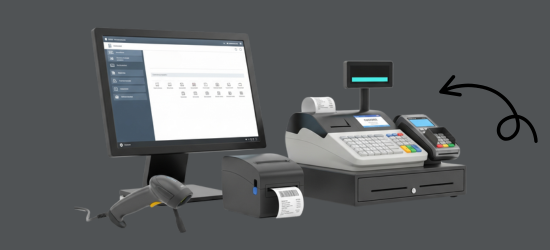
GPOS runs in a browser on the computer, tablet or phone you already own, and works with the counter equipment a pharmacy needs. We also supply the hardware itself.
Printers
- Thermal receipt printers
- Barcode and label printers for shelves and packs
- Xprinter, Rongta and G-Printer models
Barcode scanners
- 1D and 2D scanners for medicine packs
- Desktop scanners for a hands-free counter
- Zebra, Honeywell and Sunlux models
Counter hardware
- POS terminals and monitors
- Desktop CPUs
- Cash drawers
Works with
- Prescription uploads and scanning
- Batch and expiry tracking
- Cash, card and integrated online payment
- Automatic VAT and tax
Pharmacy Side by side
GPOS vs a register, Excel
or a generic POS
Many pharmacies still keep a medicine register or a spreadsheet, and some use a general shop POS. Here is what changes at each step.
| What a pharmacy needs | Register or Excel | Generic POS | GPOS Pharmacy POS |
|---|---|---|---|
| Batches and expiry dates | Checked strip by strip | Often one stock count per product | Batch and expiry recorded on every delivery, alerts before stock expires, first-in, first-out selling |
| Expired stock | Pulled from the shelf by hand | Varies by product | Expired stock taken out of sale automatically, with a filterable expiry report |
| Controlled medicines | A separate register | Varies by product | Prescription check, dosage and quantity limits, photo ID and a controlled-drug sale log |
| Prescriptions | Paper copies | Varies by product | Uploaded prescriptions, patient medication history and refill alerts |
| Drug interactions | Checked by the pharmacist | Varies by product | Drug interaction warnings at the counter |
| Billing | Totals added by hand | Barcode billing | Scan or search, then bill on a simple touch-screen |
| Inspections and audits | Registers kept by hand | Varies by product | Expiry reports and the controlled-drug log, ready for an inspection |
| Branches | Separate books | Varies by product | Every branch in real time, from any device |
Pharmacy Getting started 5 steps
How GPOS
works in your
pharmacy
Going live with GPOS in a pharmacy takes five steps. Medicines are recorded by batch and expiry from the first delivery, so the counter never sells stock it should not.
-
Set up your pharmacy
Create your branches, add pharmacists and counter staff with role-based access, and set your tax, currency and receipt options.
-
Load your medicines
Import your medicines in bulk with units and prices, and flag the controlled or restricted ones that need a prescription check.
-
Receive stock by batch
Record each delivery with its batch number and expiry date. GPOS sells first-in, first-out and warns staff before stock expires.
-
Serve at the counter
Scan or search, check the prescription, and take payment. Patient history and refill schedules stay on the customer's profile.
-
Track and stay compliant
Expiry reports, the controlled-drug sale log and sales update in real time across every branch, ready for an inspection or audit.
Customer stories
Feedback From Real Customers
Shop owners on what changed after their billing, stock and accounts moved to GPOS.
We've been using GPOS System at Adnan Drug House, and it has significantly improved our daily operations. Inventory tracking, billing, and reporting are now faster and more accurate. Highly recommended
GPOS System has been a game-changer for our pharmacy. It makes billing, inventory control, and sales management fast and accurate. Managing medicines, stock levels, customers, and reports is now much easier
This POS software has made our daily sales process much faster and more organized. The interface is simple and very easy to use.
Great customer support and customizable features. This POS solution perfectly fits our business needs
GPOS System has transformed our salon and spa operations. Billing, accounting, and inventory management are now faster, more accurate, and easier to track. It saves us valuable time every day and helps us serve customers better
We use GPOS System to manage billing, accounting, and inventory for our electronics store. It is fast, reliable, and easy to use. The real-time reports and stock management features have improved our efficiency, reduced errors in our everyday business operations
Using GPOS System for our Engine Oil distribution business has transformed operations. Billing, inventory, and accounting are now faster, accurate, and well-organized. Real-time stock tracking and detailed reports help us make better business decisions every day
I use GPOS System for my computer hardware business to manage billing, inventory, and accounting. It is reliable, easy to use, saves time, improves accuracy, and helps me efficiently manage daily business operations and stock control in single software
We use GPOS System in our supershop to manage billing, accounting, and inventory. It’s fast, reliable, and easy to use. The system has improved our efficiency and helped streamline daily operations significantly
We use GPOS System in our IT Shop every day. It’s fast, reliable, and easy to use. Inventory, sales, and billing are now fully organized, helping us save time and improve customer service. I highly recommend it for any IT shop
GPOS makes billing, inventory, and sales management easy. Manage products, clients, and reports in one for trading businesses. Highly recommended for trading business that wants to manage effortlessly!
GPOS System has been a great solution for our bike shop. It makes billing, inventory management, and sales tracking simple and efficient. Managing spare parts, customers, and reports is now much easier
GPOS System has been an excellent solution for our toy shop. It simplifies billing, inventory management, and sales tracking, making daily operations much more efficient. Managing products, customers, and reports is now easy
Safa Departmental Store has greatly benefited from using GPOS System. It has simplified billing, inventory management, and sales tracking, making daily operations faster and more efficient
GPOS System has been an excellent solution for our sanitary products business. It simplifies billing, inventory management, and sales tracking, helping us manage stock accurately and serve customers efficiently. The system is fast, reliable, and easy to use
GPOS System has been a valuable asset for our trading business. It makes billing, inventory management, and sales tracking simple and efficient. Managing products, customers, suppliers, and reports is now much easier
GPOS System has transformed the way we manage our fashion store. From billing and inventory tracking to customer management and sales reporting, everything is now organized and efficient. The system is fast, easy to use, and helps us stay on top of stock and trends
GPOS System has been a great addition to our organic products shop. It makes billing, inventory management, and sales tracking simple and efficient. Managing products, customers, and reports is now much easier, helping us save time and improve accuracy
Before you switch
FREQUENTLY
ASKED
QUESTIONS (FAQ)
Everything owners ask before moving their shop to GPOS. If your question is not here, our team is a message away.
Expert team, 24/7
With dedicated 24/7 support, GPOS goes beyond being just a platform. We are your partner, from setup and data import to training your staff.
- Support
- 24/7, dedicated
- Setup
- Same day, nothing complicated
- Trial
- Free, before you buy
What is Pharmacy POS Software by GPOS?
Pharmacy POS Software by GPOS is a cloud-based point-of-sale solution tailored specifically for pharmacies and drugstores. It streamlines sales, prescription tracking, inventory management, and customer records — all in one powerful platform. With GPOS, you can manage your entire pharmacy digitally, ensuring accuracy, compliance, and customer satisfaction.
How is this POS system different from regular POS software?
Unlike general POS systems, the GPOS Pharmacy POS includes prescription tracking, controlled substance monitoring, expiry alerts, and batch/lot number tracking. It’s designed to meet the unique needs of pharmacies, ensuring both compliance and efficiency.
Does the system manage drug inventory and expiry dates?
Absolutely. The system offers:
Real-time stock levels
Low stock alerts
Expiry date notifications
Batch number and lot tracking
Supplier purchase management
This helps reduce waste and ensures compliance with health regulations.
Is it compatible with barcode scanners and receipt printers?
Yes. The GPOS Pharmacy POS system is fully compatible with:
Barcode scanners
Receipt printers
Cash drawers
Label printers (for medicine packaging)
Can I manage multiple branches with the same software?
Yes. GPOS supports multi-branch pharmacy management, allowing you to:
Track inventory and sales across branches
Transfer stock between locations
View centralized reports
Manage staff and roles for each store
Does it include customer loyalty or reward features?
Yes. You can:
Create loyalty programs
Offer reward points per purchase
Track customer visits and history
Send SMS/email alerts for refill reminders or promotions
Is the software cloud-based or offline?
GPOS Pharmacy POS is cloud-based, allowing you to:
Access your pharmacy data from anywhere
Ensure secure data backups
Run on desktops, tablets, or POS terminals
Offline mode is also available for uninterrupted operations during internet downtime.
Is this POS system secure and compliant?
Each business has its own separate database, every user gets a role with detailed permissions, an activity log records every action and backups are encrypted. Only the people you allow can see prescriptions, patient details and sales. For VAT, GPOS is VAT (Mushak) ready, with Mushak-6.3 invoices and VAT registers.
Can I get reports for sales, inventory, and prescriptions?
Yes. You’ll have access to detailed reports including:
Daily/Monthly Sales
Top-selling medicines
Expired/near-expiry stock
Prescription reports
Profit and loss summaries
What help do I get when I start with GPOS?
The GPOS team shows you the system working live for your pharmacy in a free demo, and support is available 24/7 by phone and email. Step-by-step guides in the Help Center cover everyday tasks such as adding products, receiving stock and processing returns.
How can I start using the Pharmacy POS Software?
It’s simple:
Sign up on our website.
Choose the Pharmacy POS module.
Upload your product list or let us help you migrate.
Start managing your pharmacy in minutes.
What should a pharmacy in Bangladesh look for in POS software?
A pharmacy in Bangladesh should look for generic-name search, selling by tablet, strip or box, first-expiry-first-out selling and billing that carries on through internet cuts. GPOS has all four: type a generic such as paracetamol and you see every brand, strength and the nearest expiry, while stock stays exact to the tablet. The patient, doctor and prescription photo are saved with the bill, and batch recall traces every invoice and patient who received a batch. See what GPOS offers in Bangladesh.