Electronics and computer store POS
Electronic Shop Management Software with Serial and IMEI Tracking
GPOS Electronic Shop Management Software runs sales, stock and repairs for electronics, mobile and computer shops. Each unit is stocked under its own serial or IMEI number, a warranty check takes one scan, and faulty units go back to the supplier through RMA. High-value units can also be sold on EMI.
We are working
with the world’s biggest brands


Electronics & Computer 6 features
Following each serial
through an electronics shop
In an electronics shop the serial number matters long after the sale. These features cover finding missing units, tracing recalls and returns, a device's service history, repair parts taken from stock and receipts that carry your shop's name.
-
Find a missing unit by its serial
Because every unit is in stock under its own serial number, a stock check tells you exactly which unit is missing, not just that the count is short, so a loss can be traced.
-
Recalls and returns traced to the sale
When a model is recalled or a unit comes back, its serial shows the purchase it arrived on and the sale it left on, so you know which supplier and which customer are involved.
-
Service history behind every serial
Scan a device that comes back to the counter and its warranty and every earlier repair come up together, so staff can answer the customer without searching old job cards. Read about managing product warranties.
-
Spare parts drawn from shop stock
Parts used on a repair come out of the same inventory you sell from and are billed on the repair invoice, so the parts shelf, the job and the invoice agree.
-
Devices checked in with a diagnosis
Record each device's fault and diagnosis when it is checked in at the service desk, then follow its work order through the repair so nothing is lost between the counter and the bench. Repairs run on the repair and maintenance module.
-
Receipts and invoices in your branding
Put your store's logo and details on every invoice and receipt, so the paper a customer keeps for the warranty clearly comes from your shop.
-

Advanced
inventory with serial number trackingOur advanced inventory system with serial number tracking ensures precise stock management and seamless traceability. Easily assign unique serial numbers to products, enabling you to track each item’s movement from purchase to sale. This feature helps prevent theft, minimize losses, and streamline warranty or return processes.
- Track each item individually, reducing errors and ensuring precise stock levels.
- Easily trace items from purchase to sale, which is essential for warranties, recalls, and returns.
- Identify lost or stolen items by tracking serial numbers, reducing inventory shrinkage.
- Quickly verify warranty status and service history using serial numbers for better customer support.
-

IMEI/serial number
tracking for warranty and repairsImplementing IMEI/serial number tracking for warranty and repairs offers several benefits for businesses and customers.
- Accurate Warranty Verification
- Efficient Repair Tracking
- Improved Inventory Management
- Enhanced Theft Prevention & Recovery
- Better Customer Experience
-

Repair and
service module for electronicsRepair and Service Module for Electronics can bring several benefits to businesses that handle device repairs.
- Streamlined Workflow Management
- Improved Customer Experience
- Inventory & Parts Management
- Accurate Billing & Invoicing
- Data & Performance Insights


One platform, every module
Electronics Shop Modules From Serial to Service
Each TV, laptop and fridge is sold, guaranteed and repaired under its own serial. These modules carry that serial from the supplier's delivery through the sale, EMI, warranty claim and RMA, with the accounts kept in step.
-
Buy & make
Purchases and production
-
Stock
Every shelf and warehouse
-
Sell
At the counter and on invoice
-
Get paid
Customers, dues and books
-
Grow
Staff, messages and branches

1 · Buy & make
BackOffice
Buy from distributors and importers and know what you owe each.
- Purchase orders by model and brand
- Serials recorded as stock comes in
- Distributor ledgers with dues
- Activity log for every user's actions

1 · Buy & make
Manufacturing
Build desktop PCs from parts and sell them as one item.
- A bill of materials for each PC build
- CPU, RAM and drives drawn from stock
- The finished PC ready to sell
- Alerts when a part runs low

2 · Stock
Inventory
Every unit counted by serial, every model by brand and category.
- A serial number on each unit in stock
- Warranty period set per product
- Missing units named, not just counted
- Barcode labels for boxes and accessories
2 · Stock
Multi Warehouse
Warehouse, back room and showroom floor, with every unit's place.
- Big appliances held in the warehouse
- Transfers from warehouse to showroom
- The shelf each model sits on
- Showrooms confirm what arrives

3 · Sell
Sales
Invoices and receipts the customer keeps for the warranty.
- A4 and A5 invoices for corporate buyers
- EMI sales with a printed schedule
- Returns put the unit back by its serial
- Mushak-6.3 invoice with each appliance

3 · Sell
POS (Point of Sale)
A counter that records the exact unit going out with each sale.
- Serial scanned onto the bill at checkout
- Several customers billed at the same time
- Sales continue offline, sent once back online
- Manager PIN for discounts on big tickets

3 · Sell
Order & Quotation
Quotations for offices and schools, turned into orders and invoices.
- Quotes for a batch of office laptops
- Sales orders invoiced as units are delivered
- Drafts held while the buyer gets sign-off
- Courier delivery with parcel tracking

3 · Sell
Services
Repairs and warranty claims from job card to invoice.
- Claims logged with a checklist
- Warranty checked by serial or invoice
- Faulty units sent to the supplier as RMA
- Repairs billed from the job card

4 · Get paid
Accounting
Cash, bank, EMI dues and VAT for an electronics business.
- Installment receivables kept on the ledger
- Profit and loss for every month
- Bank statement imported and reconciled
- VAT and tax reports for the return

4 · Get paid
CRM
Every buyer's purchases, dues and rewards in one profile.
- Purchase history and dues per customer
- Member cards for repeat buyers
- Reward points on each appliance bought
- Offers on new models by SMS and email

5 · Grow
Multi business / Multi Branch
Every showroom and service point under one account.
- Each showroom keeps its own stock and staff
- Stock moved between showrooms
- Reports per showroom and for the chain
- Many shops and businesses, one account

5 · Grow
Communication
SMS and email to buyers, and notices for your showroom staff.
- Repair-ready SMS to the customer
- Bulk or automatic SMS and email
- Your own SMS gateway and sender ID
- Team notice board for every showroom

5 · Grow
HRM
Sales staff and technicians, shifts and salaries in one place.
- Records for showroom staff and technicians
- Shifts and attendance for the service desk
- Leave requests sent to the manager
- Payroll built from attendance
Hardware and what it connects to
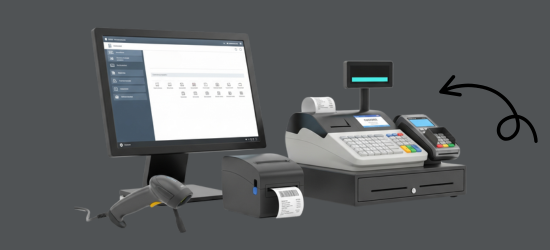
GPOS runs in a browser on the desktop, laptop, tablet or phone you already own, and works with the counter equipment you already use. We also supply the hardware itself.
Printers
- Thermal receipt printers
- Barcode and serial-number label printers
- Xprinter, Rongta and G-Printer models
Barcode scanners
- 2D scanners for IMEI and serial barcodes
- Wireless scanners for stock counts
- Zebra, Honeywell and Sunlux models
Counter hardware
- POS terminals and monitors
- Desktop CPUs
- Cash drawers
Works with
- IMEI and serial number tracking
- Repair and service jobs
- Cash, card and integrated online payment
- Automatic VAT and tax
Electronics & Computer Side by side
GPOS vs a notebook, Excel
or a generic POS
In an electronics shop every unit has a serial number, which a notebook or a basic POS rarely keeps track of. Here is what changes.
| What an electronics shop needs | Notebook or Excel | Generic POS | GPOS Electronics POS |
|---|---|---|---|
| Serial and IMEI numbers | Written by hand | Often one stock count per model | Every unit's IMEI or serial recorded on arrival and scanned at billing |
| Tracing a unit | Hard to trace | Varies by product | Each item traced from purchase to sale |
| Warranty claims | Searched in old receipts | Varies by product | Warranty status checked by serial number |
| Repairs | A separate job book | Varies by product | Devices booked in, a technician assigned and the customer kept updated |
| Spare parts | Counted by hand | Basic stock | Parts and inventory managed alongside the repair jobs |
| Lost or stolen units | Noticed at the stock count | Varies by product | Missing units identified by their serial numbers |
| Billing | Totals added by hand | Barcode billing | Scan the serial, take cash, card or online payment, print the warranty receipt |
| Branches | Separate books | Varies by product | Stock, sales and reports for every branch on one account |
Electronics & Computer Getting started 5 steps
How GPOS
works in your
electronics shop
In an electronics shop every unit has a serial number, and GPOS keeps track of it from the day it arrives to the day it comes back for a repair. Going live takes five steps.
-
Set up your shop
Create your branches, add sales and service staff with role-based access, and set your tax, currency and receipt options.
-
Load your catalogue
Add categories, brands and models, then import products in bulk or generate barcodes for the stock you already hold.
-
Receive stock with serials
Record the IMEI or serial number of every unit as it arrives, so each item can be traced from purchase to sale.
-
Sell at the counter
Scan the serial at billing, take cash, card or online payment, and print a receipt the customer keeps for the warranty.
-
Handle warranty and repairs
Check warranty status by serial number, book devices in for repair, assign a technician and keep the customer updated.
Customer stories
Feedback From Real Customers
Shop owners on what changed after their billing, stock and accounts moved to GPOS.
We use GPOS System to manage billing, accounting, and inventory for our electronics store. It is fast, reliable, and easy to use. The real-time reports and stock management features have improved our efficiency, reduced errors in our everyday business operations
I use GPOS System for my computer hardware business to manage billing, inventory, and accounting. It is reliable, easy to use, saves time, improves accuracy, and helps me efficiently manage daily business operations and stock control in single software
We use GPOS System in our IT Shop every day. It’s fast, reliable, and easy to use. Inventory, sales, and billing are now fully organized, helping us save time and improve customer service. I highly recommend it for any IT shop
GPOS System has been a great solution for our bike shop. It makes billing, inventory management, and sales tracking simple and efficient. Managing spare parts, customers, and reports is now much easier
GPOS System has been an excellent solution for our toy shop. It simplifies billing, inventory management, and sales tracking, making daily operations much more efficient. Managing products, customers, and reports is now easy
GPOS System has been an excellent solution for our sanitary products business. It simplifies billing, inventory management, and sales tracking, helping us manage stock accurately and serve customers efficiently. The system is fast, reliable, and easy to use
GPOS System has transformed the way we manage our fashion store. From billing and inventory tracking to customer management and sales reporting, everything is now organized and efficient. The system is fast, easy to use, and helps us stay on top of stock and trends
GPOS System has been a great addition to our organic products shop. It makes billing, inventory management, and sales tracking simple and efficient. Managing products, customers, and reports is now much easier, helping us save time and improve accuracy
This POS software has made our daily sales process much faster and more organized. The interface is simple and very easy to use.
Great customer support and customizable features. This POS solution perfectly fits our business needs
GPOS System has transformed our salon and spa operations. Billing, accounting, and inventory management are now faster, more accurate, and easier to track. It saves us valuable time every day and helps us serve customers better
Using GPOS System for our Engine Oil distribution business has transformed operations. Billing, inventory, and accounting are now faster, accurate, and well-organized. Real-time stock tracking and detailed reports help us make better business decisions every day
We use GPOS System in our supershop to manage billing, accounting, and inventory. It’s fast, reliable, and easy to use. The system has improved our efficiency and helped streamline daily operations significantly
We've been using GPOS System at Adnan Drug House, and it has significantly improved our daily operations. Inventory tracking, billing, and reporting are now faster and more accurate. Highly recommended
GPOS makes billing, inventory, and sales management easy. Manage products, clients, and reports in one for trading businesses. Highly recommended for trading business that wants to manage effortlessly!
GPOS System has been a game-changer for our pharmacy. It makes billing, inventory control, and sales management fast and accurate. Managing medicines, stock levels, customers, and reports is now much easier
Safa Departmental Store has greatly benefited from using GPOS System. It has simplified billing, inventory management, and sales tracking, making daily operations faster and more efficient
GPOS System has been a valuable asset for our trading business. It makes billing, inventory management, and sales tracking simple and efficient. Managing products, customers, suppliers, and reports is now much easier
Before you switch
FREQUENTLY
ASKED
QUESTIONS (FAQ)
Everything owners ask before moving their shop to GPOS. If your question is not here, our team is a message away.
Expert team, 24/7
With dedicated 24/7 support, GPOS goes beyond being just a platform. We are your partner, from setup and data import to training your staff.
- Support
- 24/7, dedicated
- Setup
- Same day, nothing complicated
- Trial
- Free, before you buy
What is an electronics store POS system?
GPOS (Point of Sale) system for electronics stores is a software solution that helps manage sales, inventory, customer data, and payments efficiently.
How does a POS system help my electronics store?
It streamlines billing, tracks inventory in real-time, manages customers and suppliers, generates reports, and supports multiple payment options.
Is a POS system necessary for small electronics stores?
Yes, even small electronics stores benefit from a POS system as it helps with accurate stock tracking, faster transactions, and better financial reporting.
Can the POS system manage serial numbers and warranties?
Yes, a good electronics store POS should support serial number tracking and warranty management for products.
Does the POS system support barcode scanning?
Yes, most modern POS systems integrate with barcode scanners for quick and accurate product identification.
Can I create invoices and receipts with my store’s branding?
Yes, a POS system allows you to generate customized invoices and receipts with your store’s logo and details.
Does GPOS track IMEI numbers and warranty claims for electronics and mobile shops in Bangladesh?
GPOS follows every unit you sell by its serial or IMEI number, and scanning the serial or the invoice shows its warranty. Claims come with checklists and service job cards, and units that must go back to the supplier are sent and received through supplier RMA. You can also sell phones and laptops on EMI, with a printed installment schedule. Learn more about Bangladeshi POS software.