Quick service restaurants
Quick Service POS System for Combos, Offers and Short Queues
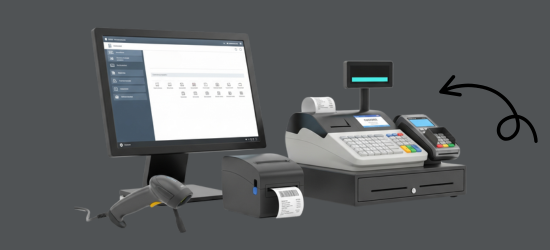
At a quick service counter, the GPOS Quick Service POS System takes dine-in and takeaway orders at one till. Combos and meal offers apply themselves, the kitchen screen beeps on every new order, and a TV on the wall can run your promotions as an in-store ad screen.
We are working
with the world’s biggest brands


Quick Service Restaurant 6 features
Keeping the queue short
at a quick service counter
Beyond custom orders and quick checkout, these tools help a quick service restaurant sell more per order and run more than one outlet: add-ons on the customer screen, offers at the till, returns, shifts for peak hours and one menu across a chain.
-
Add-ons suggested on the customer screen
While the order is being keyed in, the customer display can show a combo, a promotion or a recommended add-on, so customers see the offer before they pay.
-
One menu across a quick-service chain
Run every outlet of your chain on one platform: change a menu item or price once for all branches, and see each branch's sales in its own report.
-
Shifts planned around peak hours
Use the peak times from your order reports to set up shifts, so more staff are on the counter when more orders come in.
-
Wrong orders returned at the till
If an order goes out wrong, process a sales return at the till and replace or refund it, with stock and sales corrected in the same step.
-
Dine-in and takeaway from one counter
Take dine-in and takeaway orders at the same till, with the same modifiers and combos, so the queue keeps moving however customers choose to eat.
-
Meal offers that the till applies
Create an offer once and the till applies it when an order qualifies, and the customer sees the discount itemised on their screen before paying.
-

Order
CustomizationOrder Customization feature in restaurant GPOS allows customers to personalize their orders by adding modifiers, toppings, or substitutions with ease. Staff can quickly adjust items, create combos, or split orders. This ensures accuracy and flexibility, catering to individual preferences while streamlining the ordering process for both dine-in and takeaway.
- Add, remove, or substitute ingredients with a simple tap.
- Build personalized meal combos based on customer preferences.
- Allows staff to add specific customer requests (e.g., “extra spicy” or “no onions”).
- Enable customers to share or split orders (e.g., half pepperoni, half veggie pizza).
- Quick access to popular customizations for faster order processing.
-

Quick
Checkout OptionsQuick checkout options in a Quick Service Restaurant POS ensure fast transactions with a touch-friendly interface, integrated card readers, and support for contactless payments like Apple Pay and Google Pay. These features streamline the payment process, reduce wait times, and enhance customer satisfaction, ideal for high-volume, fast-paced environments.
- Streamlined, user-friendly design for quick order placement with minimal training.
- Supports card payments, mobile wallets (Apple Pay, Google Pay), and cash for faster transactions.
- Quickly process orders with pre-configured payment and receipt options.
- Enables tap-to-pay and QR code payments, enhancing speed and safety.
- Pre-set buttons for popular menu items to reduce checkout time.
-

Customer
Display ScreensCustomer Display Screens in restaurant POS systems enhance transparency by showing real-time order details, itemized pricing, taxes, and discounts. They build customer trust and improve accuracy while promoting upselling with combo offers or add-ons. These displays often support multiple languages and can include order progress updates for a seamless dining experience.
- Displays the customer’s order details, including items, quantities, and prices, ensuring accuracy.
- Breaks down taxes, discounts, and total costs to improve trust and transparency.
- Shows promotions, combos, or recommended add-ons to encourage additional purchases.
- Displays real-time order status (e.g., "Order Confirmed" or "Preparing") to enhance the customer experience.

One platform, every module
Quick Service POS Modules That Keep the Queue Short
At a quick service restaurant, every minute at the till shows up in the queue. These modules keep combos, offers, kitchen tickets, stock and staff in step, in one outlet or across a whole chain.
-
Buy & make
Purchases and production
-
Stock
Every shelf and warehouse
-
Sell
At the counter and on invoice
-
Get paid
Customers, dues and books
-
Grow
Staff, messages and branches

1 · Buy & make
BackOffice
Supplier purchases and dues for every outlet in the chain.
- Purchase orders for packaging and drinks
- Supplier ledgers that show every due
- Activity log of price and menu edits
- Excel import when you add a new menu

1 · Buy & make
Manufacturing
Recipes for each menu item, so ingredients leave stock as meals are made.
- Bill of materials for every combo item
- Patties, buns and sauces drawn from stock
- Prepared items ready to sell at the till
- Ingredient alerts before the evening peak

2 · Stock
Inventory
Every cup, lid, patty and sauce sachet counted across the day's orders.
- Regular and large sizes as variants
- Alerts before cups and lids run out
- Expired products report for chilled stock
- Bulk updates when menu prices change
2 · Stock
Multi Warehouse
A central store that supplies every outlet, with each transfer tracked.
- Central store and outlet stock side by side
- Transfers sent to outlets each morning
- Shelf location for each carton
- Receipts confirmed by the outlet manager

3 · Sell
Sales
Fast bills at the counter, and returns handled without holding up the line.
- Wrong orders refunded or replaced at the till
- Discounts shown line by line on the bill
- Mushak-6.3 invoices for VAT customers
- Peak-hour and best-seller reports

3 · Sell
POS (Point of Sale)
Dine-in and takeaway at one till, with offers that apply themselves.
- Popular items on one-tap buttons
- Customer screen showing items and discounts
- Kitchen screen that beeps on new orders
- Several orders open on one till

3 · Sell
Order & Quotation
Group and pre-booked orders, from quotation to the final bill.
- Quotes for school and office group meals
- Sales orders held as drafts until confirmed
- Order converted to an invoice when served
- Shared orders split into separate bills

3 · Sell
Services
Job cards and warranty checks if your business sells services too.
- Service jobs carried from card to invoice
- Warranty found from a serial or invoice
- RMA claims sent back to the supplier
- IMEI and serial numbers per item

4 · Get paid
Accounting
Every outlet's takings and costs in double-entry books.
- Double-entry books behind every till
- Expenses from packaging to rent
- Trial balance and cash flow on demand
- Bank reconciliation, also by statement import

4 · Get paid
CRM
Member cards and points that bring the lunch crowd back.
- Member tiers with their own prices
- Points earned on every combo
- One-time coupons for a new item
- Offers sent to members by SMS or email

5 · Grow
Multi business / Multi Branch
A chain of quick service outlets run from one account and one menu.
- Menu prices changed once for every outlet
- Each outlet with its own stock and staff
- Stock moved from a busy outlet to a quiet one
- Outlet reports beside the chain total

5 · Grow
Communication
SMS and email for customers, and a notice board for every outlet's team.
- New combo launches sent by SMS
- Messages from your own sender ID
- Automatic or manual SMS and email
- Team notices shared across outlets

5 · Grow
HRM
Counter and kitchen staff scheduled around your peak hours.
- Shifts planned around lunch and dinner peaks
- Daily attendance at each outlet
- Leave requests with manager sign-off
- Salaries worked out from attendance
Quick Service Restaurant Getting started 5 steps
How GPOS
works in your
quick service restaurant
Setting up a quick service restaurant on GPOS takes five steps. Quick checkout options cut wait times, and you can choose the payment method for each sale at the till.
-
Configure your counter
Pre-configure your payment and receipt options and add pre-set buttons for popular items, so new staff can take orders with minimal training.
-
Load your menu and modifiers
Add your menu items with modifiers, toppings and substitutions, and keep the most popular customisations within quick reach of your staff.
-
Customise orders on the spot
Add requests such as extra spicy or no onions, build meal combos, or split a pizza half and half, and the kitchen display shows every change.
-
Speed through checkout
Accept card, mobile wallet, tap-to-pay, QR code or cash payments. The customer display shows itemised prices, taxes and discounts, then the order's status.
-
Review bestsellers and peak times
Order reports show your best-selling items, average order value and peak order times, so you can plan for your busiest hours.
Customer stories
Feedback From Real Customers
Shop owners on what changed after their billing, stock and accounts moved to GPOS.
This POS software has made our daily sales process much faster and more organized. The interface is simple and very easy to use.
Great customer support and customizable features. This POS solution perfectly fits our business needs
GPOS System has transformed our salon and spa operations. Billing, accounting, and inventory management are now faster, more accurate, and easier to track. It saves us valuable time every day and helps us serve customers better
We use GPOS System to manage billing, accounting, and inventory for our electronics store. It is fast, reliable, and easy to use. The real-time reports and stock management features have improved our efficiency, reduced errors in our everyday business operations
Using GPOS System for our Engine Oil distribution business has transformed operations. Billing, inventory, and accounting are now faster, accurate, and well-organized. Real-time stock tracking and detailed reports help us make better business decisions every day
I use GPOS System for my computer hardware business to manage billing, inventory, and accounting. It is reliable, easy to use, saves time, improves accuracy, and helps me efficiently manage daily business operations and stock control in single software
We use GPOS System in our supershop to manage billing, accounting, and inventory. It’s fast, reliable, and easy to use. The system has improved our efficiency and helped streamline daily operations significantly
We use GPOS System in our IT Shop every day. It’s fast, reliable, and easy to use. Inventory, sales, and billing are now fully organized, helping us save time and improve customer service. I highly recommend it for any IT shop
We've been using GPOS System at Adnan Drug House, and it has significantly improved our daily operations. Inventory tracking, billing, and reporting are now faster and more accurate. Highly recommended
GPOS makes billing, inventory, and sales management easy. Manage products, clients, and reports in one for trading businesses. Highly recommended for trading business that wants to manage effortlessly!
GPOS System has been a great solution for our bike shop. It makes billing, inventory management, and sales tracking simple and efficient. Managing spare parts, customers, and reports is now much easier
GPOS System has been an excellent solution for our toy shop. It simplifies billing, inventory management, and sales tracking, making daily operations much more efficient. Managing products, customers, and reports is now easy
GPOS System has been a game-changer for our pharmacy. It makes billing, inventory control, and sales management fast and accurate. Managing medicines, stock levels, customers, and reports is now much easier
Safa Departmental Store has greatly benefited from using GPOS System. It has simplified billing, inventory management, and sales tracking, making daily operations faster and more efficient
GPOS System has been an excellent solution for our sanitary products business. It simplifies billing, inventory management, and sales tracking, helping us manage stock accurately and serve customers efficiently. The system is fast, reliable, and easy to use
GPOS System has been a valuable asset for our trading business. It makes billing, inventory management, and sales tracking simple and efficient. Managing products, customers, suppliers, and reports is now much easier
GPOS System has transformed the way we manage our fashion store. From billing and inventory tracking to customer management and sales reporting, everything is now organized and efficient. The system is fast, easy to use, and helps us stay on top of stock and trends
GPOS System has been a great addition to our organic products shop. It makes billing, inventory management, and sales tracking simple and efficient. Managing products, customers, and reports is now much easier, helping us save time and improve accuracy
Before you switch
FREQUENTLY
ASKED
QUESTIONS (FAQ)
Everything owners ask before moving their shop to GPOS. If your question is not here, our team is a message away.
Expert team, 24/7
With dedicated 24/7 support, GPOS goes beyond being just a platform. We are your partner, from setup and data import to training your staff.
- Support
- 24/7, dedicated
- Setup
- Same day, nothing complicated
- Trial
- Free, before you buy
What is a Quick Service Restaurant (QSR) POS?
QSR POS is a point-of-sale system designed specifically for fast-paced environments like quick-service restaurants, focusing on speed, efficiency, and features like order customization, drive-thru management, and inventory tracking.
How does a QSR POS improve order accuracy?
QSR POS systems use features like visual order confirmation, modifiers for customization, and kitchen display systems (KDS) to ensure accurate communication between customers, staff, and the kitchen.
Can a QSR POS handle drive-thru orders?
Yes, most QSR POS systems include drive-thru management features like dual-lane support, order timers, and seamless integration with kitchen displays for faster service.
Can it handle QR code ordering?
QSR GPOS systems integrate with third-party platforms like DoorDash, Uber Eats, or Grubhub, allowing restaurants to manage in-house and online orders in one place
Is it easy to train staff to use a QSR POS?
QSR POS systems are designed with user-friendly interfaces and intuitive workflows, making it easy to train staff quickly, even during busy hours.