
Super shops and supermarkets
Supermarket POS Software with Fast Checkouts and Timed Offers
Supermarket POS software from GPOS keeps checkouts and shelves moving at supermarkets and super shops. Weighed goods carry scale labels the POS scans, offers switch on by day and hour, each drawer closes on a counted total, and member cards earn extra points. Through the Eid rush, billing carries on even if the internet drops.
We worked
with the world’s biggest brands


Super Shop 6 features
Ready for the queues
at a busy supermarket
A supermarket runs on promotions, quick checkouts and stock that goes out of date. These features cover combo deals and scheduled campaigns, an express lane mode, batch and expiry control for perishables, and billing that carries on when the internet drops.
-
Combo deals and family packs
Build Buy 1 Get 1 offers, family packs and mixed-product bundles. The bundle price adjusts itself, and stock comes off each item in the combo as it sells, so shelf counts stay right.
-
Promotions scheduled by date
Give each promotion a start and end date so it runs for exactly the weekend or festival you planned, then check its usage figures to see which offers shoppers actually took. See how to create an offer.
-
Fast Lane mode for express counters
Switch an express counter or a mobile checkout device to Fast Lane mode: one tap to scan and bill, promotions applied automatically, contactless payment, and quick reprint or void when a receipt goes wrong.
-
First in, first out by batch
Stock is held batch by batch and first-in, first-out movement is enforced, so older dairy, meat and produce leave the shelf before the delivery that came in behind them.
-
Mark down stock before it expires
Get an alert as items near their expiry date, set an expiry-based discount to clear them while they can still be sold, and pull an expired-product report for whatever is left. Managing expired products is covered in the Help Center.
-
Billing carries on offline
If the internet drops in the middle of a rush, the checkouts keep billing in offline mode. Sales are stored and sync to the cloud automatically once the connection is back.
-

Supermarket
Combo & Bundle PromotionsCreate and manage complex product bundles and combo deals (e.g., “Buy 1 Get 1,” “Family Packs,” etc.) with ease. Tailored for supermarkets that frequently run mixed-product offers, this system boosts sales and customer value while tracking inventory impact in real-time.
- Dynamic combo deal creation
- Auto bundle price adjustments
- Real-time inventory sync for combos
- Schedule-based campaign management
- Promotion usage analytics
-

Fast Lane
Express Checkout ModeDesigned for high-traffic supermarkets, this mode enables ultra-fast billing by minimizing steps for scanning, payment, and receipt printing. Ideal for express counters or mobile checkout devices, it speeds up service without compromising accuracy, keeping customer queues short and satisfaction high.
- One-tap item scan and bill
- Integrated barcode scale support
- Auto-discount and promo application
- NFC/contactless payment integration
- Quick reprint & void features
-

Smart Expiry
& Batch ManagementThis feature tracks product batches and expiration dates in real-time, ensuring perishable goods are rotated efficiently. It helps reduce waste, automate discounting near expiry, and streamline stock replenishment decisions—perfect for supermarkets dealing with high-volume food inventory.
- Batch-wise inventory tracking
- Auto alerts for expiring items
- Expiry-based discounting
- FIFO stock movement enforcement
- Expired product report generation


One platform, every module
The Modules Behind a Busy Supermarket
A supermarket needs quick counters, offers that apply themselves and exact stock across many aisles. These modules connect each checkout to the stockroom, the suppliers and the books.
-
Buy & make
Purchases and production
-
Stock
Every shelf and warehouse
-
Sell
At the counter and on invoice
-
Get paid
Customers, dues and books
-
Grow
Staff, messages and branches

1 · Buy & make
BackOffice
Buying from many suppliers without losing track of dues.
- Purchase orders for each supplier
- Damaged cartons sent back as purchase returns
- Supplier dues on one ledger
- Activity log of every price change

1 · Buy & make
Manufacturing
In-house bakery and packed food made from your stock.
- In-house bakery made from a recipe
- Ingredients taken off stock as you produce
- Fruit baskets assembled from shelf stock
- Raw material alerts for the kitchen

2 · Stock
Inventory
Exact stock for every aisle, batch and expiry date.
- Batch and expiry on dairy and packed food
- Expired items listed before they reach a lane
- Alert quantities for fast-moving staples
- Shelf barcodes printed from your own design
2 · Stock
Multi Warehouse
A central warehouse feeding the shop floor.
- Central store stock apart from the floor
- Which shelf holds each product
- Replenishment transfers to each outlet
- Outlets confirm deliveries on arrival

3 · Sell
Sales
Every basket billed, returned or invoiced from one record.
- Thermal receipts or A4 invoices for offices
- Returns that go straight back on the shelf
- Mushak-6.3 invoices for VAT buyers
- Sales, sold products and returns reports

3 · Sell
POS (Point of Sale)
Checkout lanes that keep moving through the evening rush.
- Weighing-scale labels read at the counter
- Lanes that keep billing offline
- Counted close with X and Z reports
- Safe drops when a drawer gets too full

3 · Sell
Order & Quotation
Corporate and bulk orders from quote to delivery.
- Quotes for office Eid gift packs
- Sales orders confirmed before packing
- Order to invoice as goods leave
- Home delivery by courier, tracked to the door

3 · Sell
Services
Warranty and repairs for the appliance aisle.
- Serial numbers on TVs, fans and blenders
- Warranty check from the receipt
- Supplier RMA for faulty appliances
- Job cards for appliance repairs

4 · Get paid
Accounting
Takings from every lane posted to cash and bank.
- Day book with every counter's takings
- Cash flow and trial balance on demand
- Bank deposits reconciled to the statement
- VAT registers kept from each sale

4 · Get paid
CRM
Member cards that bring shoppers back each week.
- Tiers with member-only prices
- Extra reward points for members
- One-time coupons redeemed at the lane
- Offers sent to members by SMS and email

5 · Grow
Multi business / Multi Branch
Every outlet of your super shop chain under one account.
- Outlets in Dhaka and Chattogram on one account
- Own stock and staff per outlet
- Transfers when an outlet runs short
- Chain-wide and per-outlet reports

5 · Grow
Communication
Offers to shoppers and notices to every outlet.
- Weekend offer SMS to members
- Your sender ID on every message
- Email or SMS, sent by hand or automatically
- Floor notices for every outlet's team

5 · Grow
HRM
Cashiers, packers and guards on shift, paid on time.
- Records for every lane and floor staff
- Shifts that cover long opening hours
- Attendance that feeds payroll
- Leave planned before the Eid rush
Hardware and what it connects to
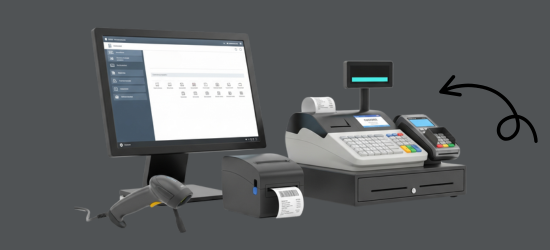
GPOS runs in a browser on the desktop, laptop, tablet or phone you already own, and works with the checkout equipment a supermarket uses every day. We also supply the hardware itself.
Printers
- Thermal receipt printers for every checkout
- Barcode and shelf label printers
- Xprinter, Rongta and G-Printer models
Barcode scanners
- Corded and desktop scanners for busy counters
- Wireless scanners for stock counts
- Zebra, Honeywell and Sunlux models
Counter hardware
- POS terminals and touchscreen monitors
- Desktop CPUs
- Cash drawers that open on each sale
Works with
- Integrated barcode scales
- NFC and contactless payment
- Cash, card and integrated online payment
- Automatic VAT and tax
Super Shop Side by side
GPOS vs a cash book, Excel
or a generic POS
Busy supermarkets outgrow a cash book or a spreadsheet fast, and a basic POS rarely knows about batches or combos. Here is what changes.
| What a supermarket needs | Cash book or Excel | Generic POS | GPOS Supermarket POS |
|---|---|---|---|
| A fast checkout | Totals added by hand | Barcode billing | Fast Lane express mode, integrated barcode scales and contactless payment |
| Batches and expiry dates | Checked shelf by shelf | Often one stock count per product | Batch-wise stock, alerts before items expire and first-in, first-out movement |
| Clearing near-expiry stock | Marked down by hand | Manual price changes | Expiry-based discounts and an expired-product report |
| Combos and offers | Worked out at the counter | Simple discounts | Buy 1 Get 1, family packs and scheduled campaigns that apply at billing |
| Several checkout counters | Not practical | Varies by product | Every counter on one stock, with role-based access for cashiers and managers |
| Receiving deliveries | Copied from the supplier's bill | Basic stock-in | Purchase orders, with goods received by batch number and expiry date |
| Shelf labels | Written by hand | Standard label layouts | Barcode and shelf labels printed for the stock already on your shelves |
| Branches and warehouses | Separate books | Varies by product | Stock moved between warehouses and branches, with real-time reports |
Super Shop Getting started 5 steps
How GPOS
works in your
supermarket
Opening a supermarket on GPOS follows the same five steps whether you run one store or a chain. Products, prices and promotions are set up once, and every checkout counter uses them.
-
Set up your store
Create your branches and checkout counters, add cashiers and managers with role-based access, and set your tax, currency and receipt options.
-
Load your catalogue
Import products in bulk, set units and prices, and print barcode and shelf labels for the stock already on your shelves.
-
Receive stock by batch
Raise purchase orders, receive goods with batch numbers and expiry dates, and move stock between warehouses and branches.
-
Bill at the checkout
Scan, let combo and bundle offers apply themselves, and take cash, card or contactless payment. Fast Lane mode keeps the express counter moving.
-
Track and reorder
Sales, stock levels and near-expiry items update in real time, so you reorder before the shelves run empty.
Customer stories
Feedback From Real Customers
Shop owners on what changed after their billing, stock and accounts moved to GPOS.
We use GPOS System in our supershop to manage billing, accounting, and inventory. It’s fast, reliable, and easy to use. The system has improved our efficiency and helped streamline daily operations significantly
Safa Departmental Store has greatly benefited from using GPOS System. It has simplified billing, inventory management, and sales tracking, making daily operations faster and more efficient
GPOS System has been a great solution for our bike shop. It makes billing, inventory management, and sales tracking simple and efficient. Managing spare parts, customers, and reports is now much easier
GPOS System has been an excellent solution for our toy shop. It simplifies billing, inventory management, and sales tracking, making daily operations much more efficient. Managing products, customers, and reports is now easy
GPOS System has been an excellent solution for our sanitary products business. It simplifies billing, inventory management, and sales tracking, helping us manage stock accurately and serve customers efficiently. The system is fast, reliable, and easy to use
GPOS System has transformed the way we manage our fashion store. From billing and inventory tracking to customer management and sales reporting, everything is now organized and efficient. The system is fast, easy to use, and helps us stay on top of stock and trends
GPOS System has been a great addition to our organic products shop. It makes billing, inventory management, and sales tracking simple and efficient. Managing products, customers, and reports is now much easier, helping us save time and improve accuracy
This POS software has made our daily sales process much faster and more organized. The interface is simple and very easy to use.
Great customer support and customizable features. This POS solution perfectly fits our business needs
GPOS System has transformed our salon and spa operations. Billing, accounting, and inventory management are now faster, more accurate, and easier to track. It saves us valuable time every day and helps us serve customers better
We use GPOS System to manage billing, accounting, and inventory for our electronics store. It is fast, reliable, and easy to use. The real-time reports and stock management features have improved our efficiency, reduced errors in our everyday business operations
Using GPOS System for our Engine Oil distribution business has transformed operations. Billing, inventory, and accounting are now faster, accurate, and well-organized. Real-time stock tracking and detailed reports help us make better business decisions every day
I use GPOS System for my computer hardware business to manage billing, inventory, and accounting. It is reliable, easy to use, saves time, improves accuracy, and helps me efficiently manage daily business operations and stock control in single software
We use GPOS System in our IT Shop every day. It’s fast, reliable, and easy to use. Inventory, sales, and billing are now fully organized, helping us save time and improve customer service. I highly recommend it for any IT shop
We've been using GPOS System at Adnan Drug House, and it has significantly improved our daily operations. Inventory tracking, billing, and reporting are now faster and more accurate. Highly recommended
GPOS makes billing, inventory, and sales management easy. Manage products, clients, and reports in one for trading businesses. Highly recommended for trading business that wants to manage effortlessly!
GPOS System has been a game-changer for our pharmacy. It makes billing, inventory control, and sales management fast and accurate. Managing medicines, stock levels, customers, and reports is now much easier
GPOS System has been a valuable asset for our trading business. It makes billing, inventory management, and sales tracking simple and efficient. Managing products, customers, suppliers, and reports is now much easier
Before you switch
FREQUENTLY
ASKED
QUESTIONS (FAQ)
Everything owners ask before moving their shop to GPOS. If your question is not here, our team is a message away.
Expert team, 24/7
With dedicated 24/7 support, GPOS goes beyond being just a platform. We are your partner, from setup and data import to training your staff.
- Support
- 24/7, dedicated
- Setup
- Same day, nothing complicated
- Trial
- Free, before you buy
What makes your POS system ideal for supermarkets?
Our POS system is built specifically for high-volume retail environments. Features like barcode scanning, bulk item pricing, shelf-label printing, perishable stock tracking, and multi-checkout support make it perfect for supermarkets. It also handles multiple departments, vendors, and payment types with ease.
Does it support inventory and stock management?
Yes, our POS system offers real-time inventory management. You can track incoming and outgoing stock, set reorder levels, manage expiry dates, and get alerts when items run low — all tailored for fast-moving consumer goods in supermarket settings.
Can it manage multiple checkout counters?
Absolutely. Our system supports multi-terminal synchronization, allowing several checkout counters to operate simultaneously. This reduces wait times and improves customer flow during peak hours.
Is it suitable for managing perishable and non-perishable goods?
Yes, our POS system includes expiry date tracking and batch-level inventory controls, which are essential for supermarkets handling perishable items like dairy, meat, and produce. Non-perishable goods are just as easy to manage with bulk inventory and categorization features.
Does it come with barcode scanning and printing support?
Yes. It fully supports barcode scanning, automatic product lookup, and label printing for shelves and packaging. It’s compatible with most industry-standard barcode printers and scanners.
Is the system cloud-based or offline?
Our supermarket POS system is cloud-based, ensuring data security, remote access, and automatic backups. However, it also includes offline mode, allowing transactions to continue even when the internet is down — data syncs automatically when the connection is restored.
Can I track sales and performance reports?
Yes. You’ll have access to a full suite of real-time reports, including daily sales, best-selling items, profit margins, staff performance, and customer trends — all from your dashboard or mobile app
Does it support multiple branches or stores?
Yes. Our system is designed for multi-store management. You can control inventory, pricing, and staff access across multiple supermarket branches from one central admin panel.
How easy is it to train staff to use the POS system?
Cashiers mostly scan, take payment and print the receipt, so the counter screen is quick to learn. Each person gets a login that shows only what their role needs, and step-by-step guides in the Help Center walk through everyday tasks such as sales, returns and stock transfers.
What types of payments are supported?
GPOS accepts multiple payment methods at the counter, such as cash and card. Coupons and gift vouchers are paid on the POS, members redeem reward points on the bill, and offers such as Buy X Get Y apply themselves as the items are scanned.
Is customer loyalty and promotions included?
Yes. You can run customer loyalty programs, offer discounts, promo codes, or bundle deals. Our system helps you increase repeat business and boost revenue through targeted offers.
What kind of support is available?
Support is available 24/7 by phone on +880 1792-288555 and by email at support@gposs.com. Before you start, the team can show you GPOS working live for your super shop in a free demo, and the Help Center has step-by-step guides for everyday tasks.
Can a super shop in Bangladesh keep its counters fast and its cash in check with GPOS?
Yes. Barcode and weighing-scale labels are read straight at the POS to keep the counters moving, and cash control covers safe drops during the day, a counted close and X/Z reports. Discounts can sit behind a manager PIN, and offers such as Buy X Get Y switch on by day and hour, so an Eid or Friday deal runs by itself. If the internet drops in the rush, the counters keep selling. Find out more about POS software for Bangladeshi shops.