
Custom tailoring POS
Custom Tailoring Shop POS Software from Measuring to Handover
Tailors who sew to measure work from the job card, and GPOS Custom Tailoring Shop POS Software is built around it. The last measurements fill in by themselves on a client's next order. Collar, cuff and pocket choices print on the card, and the work board moves each piece through cutting, sewing and finishing.
We are working
with the world’s biggest brands


Custom Tailoring 6 features
What a custom tailoring shop
needs at every stage
Custom work means many fittings, many measurements and a lot of small parts. These features cover the fitting calendar, measuring on a tablet, accessories tracked by barcode, the record each order keeps, offers to past clients and fabric reorders.
-
Drag-and-drop calendar for fittings
Book as many fitting sessions as a garment needs and drag them to a new slot on the calendar when a client reschedules, so the delivery date you set stays realistic.
-
Measurements entered on a tablet or phone
Enter measurements on a phone or tablet while the client is standing in front of you, then bring them up at once when the client comes back for another garment.
-
Barcodes on buttons, zips and linings
Track fabric, buttons, zips, linings and other accessories by barcode, so you can see what is left and avoid running short halfway through an order. Learn how to generate barcodes.
-
Fabric and accessories recorded per order
Each order keeps its number, status, due date, assigned tailor and the fabric and accessories used, so anyone at the counter can answer a client's question without phoning the workroom.
-
Promotional offers to past clients
Use the same SMS and email messages that carry order updates and delivery reminders to send promotional offers to past clients, so they hear from you between orders.
-
Fabric reorders by purchase order
Keep your fabric and trim suppliers on file, raise a purchase order when stock runs low, and check what you owe each one in the supplier ledger.
-
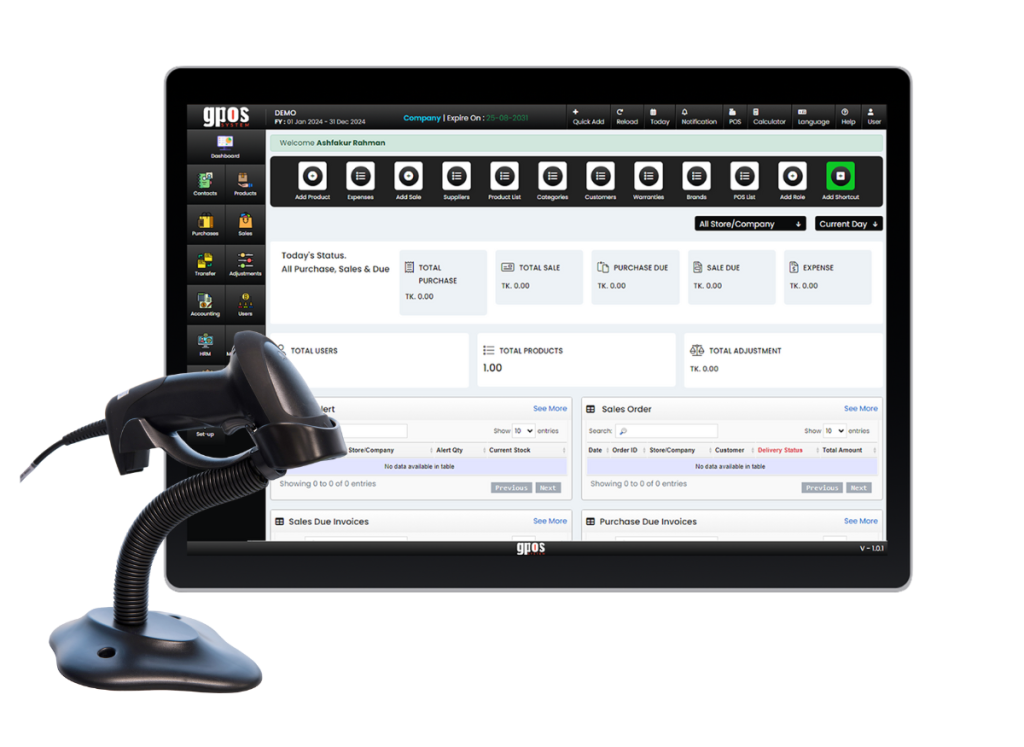
Advanced
Measurement ManagementGPOS System offers an exclusive measurement management module designed specifically for tailoring businesses. It stores and tracks detailed body measurements for each client, ensuring accuracy and convenience for repeat orders and custom fits, eliminating manual errors and streamlining the tailoring workflow.
- Save unlimited client measurements
- Visual measurement guide
- Quick access for repeat orders
- Measurement history tracking
- Mobile-friendly entry interface
-
Design &
Fabric Catalog IntegrationTailors can showcase available fabrics and design options directly within the POS. Clients can choose their preferences during booking, making the ordering process more visual and engaging while reducing consultation time and increasing upsell opportunities.
- Upload fabric images with specs
- Categorize by color, texture, and type
- Design style lookbook
- Instant selection from catalog during order
- Fabric stock linking to POS inventory
-
Delivery Date &
Fitting Session SchedulerUnlike generic POS systems, GPOS System includes a scheduler tailored to tailoring shops. It helps manage multiple fitting sessions, track garment progress, and set realistic delivery dates—minimizing delays and improving customer satisfaction.
- Multi-stage order tracking (cutting, stitching, finishing)
- SMS/Email alerts for fittings & pickup
- Visual calendar with drag & drop events
- Priority job flagging
- Integrated staff assignment for each stage

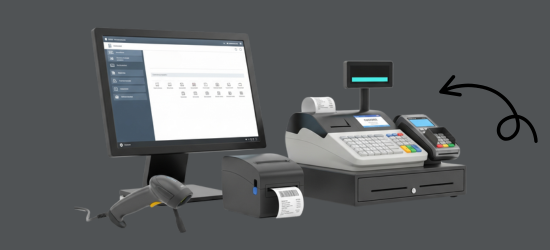
One platform, every module
Custom Tailoring Shop POS Modules for Every Fitting
Custom work means fittings, small parts and a fresh design on every order. These modules keep each client's figures, the fitting calendar, the buttons and linings in stock and the money owed in one place.
-
Buy & make
Purchases and production
-
Stock
Every shelf and warehouse
-
Sell
At the counter and on invoice
-
Get paid
Customers, dues and books
-
Grow
Staff, messages and branches

1 · Buy & make
BackOffice
Reorder fabric and trims on time and see what each supplier is owed.
- Purchase orders when stock runs low
- Supplier ledgers for fabric and trim houses
- Staff logins with roles and an activity log
- Bulk updates to products from Excel

1 · Buy & make
Manufacturing
Materials planned for a garment and drawn from stock as it is made.
- Bill of materials per garment style
- Linings and buttons drawn as work starts
- Cutting, stitching and finishing stages
- Alerts when a raw material runs low

2 · Stock
Inventory
Every button, zip and lining on the shelf, tracked by barcode.
- Barcodes on buttons, zips and linings
- Fabric catalog linked to live stock
- Shortages flagged before an order stalls
- Trims and fabric used, kept on each order
2 · Stock
Multi Warehouse
Back-room fabric stock and the shop floor, kept in step.
- Stock counted in every store and studio
- Trims moved between locations
- Shelf numbers for every fabric
- Receipts confirmed by the receiving branch

3 · Sell
Sales
Price lists by fabric and design turn each order into a clear bill.
- Prices set by fabric and by design
- A4 invoices that list each garment
- Sales returns that restock the item
- Mushak-6.3 invoices for VAT customers

3 · Sell
POS (Point of Sale)
One counter for booking fittings, taking advances and billing pickups.
- Several clients' bills open at once
- Advance and part payments on each order
- Works when the internet goes down
- Multiple payment methods on one bill

3 · Sell
Order & Quotation
From quotation to fittings to the final delivery date.
- Quotes for one-off designs
- Fittings booked on a drag-and-drop calendar
- Delivery dates you can keep
- Order status, due date and assigned tailor

3 · Sell
Services
Alterations and remakes handled as job cards through to the bill.
- Alteration jobs with their own job card
- Workshop copies printed without prices
- Status board from Received to Ready
- Invoices raised when the work is done

4 · Get paid
Accounting
Advances, balances and studio costs kept in double-entry books.
- Cash and bank accounts kept apart
- Receipts, payments and expenses
- Bank statements matched by import
- Profit and loss at month end

4 · Get paid
CRM
Each client's measurements, styles and past orders on file.
- Unlimited measurement sets per client
- Promotional offers to past clients
- Gift vouchers for a client's next order
- Dues shown before the next booking

5 · Grow
Multi business / Multi Branch
A second studio or outlet runs under the same account.
- Each studio with its own stock and staff
- Trims sent between branches
- Reports per branch or for all of them
- More than one business in one account

5 · Grow
Communication
Order updates, delivery reminders and offers by SMS and email.
- Delivery reminders before pickup day
- Ready SMS when the piece is finished
- Offers to clients between orders
- Sender ID with your shop's name

5 · Grow
HRM
Tailors, cutters and finishers, their days and their pay.
- Commission recorded for each tailor
- Attendance and shifts for the studio
- Leave requests from your tailors
- Salaries worked out from attendance
Custom Tailoring Getting started 5 steps
How GPOS
works in your
custom tailoring shop
Every custom order is a new mix of fabric, style and fit. These five steps let clients choose fabrics and designs from your catalogue while booking, then track the garment through cutting, stitching and finishing.
-
Set staff and price lists
Add your tailors and counter staff, and set up price lists based on fabric or design so every custom order is priced the same way.
-
Build your fabric catalogue
Upload fabric images with their specs, sort them by colour, texture and type, and link each fabric to its stock in your POS inventory.
-
Measure and choose the design
Save casual and formal measurement profiles with the visual measurement guide, then pick fabric and style from the lookbook while the client is booking.
-
Schedule every stage
Move each order through cutting, stitching and finishing on the visual calendar, assign staff to each stage, and flag the priority jobs that must go first.
-
Alert clients and deliver
Send SMS or email alerts for fittings and pickup, move the order from In Progress to Completed and Delivered, and track each tailor's tasks and commission.
Customer stories
Feedback From Real Customers
Shop owners on what changed after their billing, stock and accounts moved to GPOS.
GPOS System has transformed the way we manage our fashion store. From billing and inventory tracking to customer management and sales reporting, everything is now organized and efficient. The system is fast, easy to use, and helps us stay on top of stock and trends
GPOS System has been a great solution for our bike shop. It makes billing, inventory management, and sales tracking simple and efficient. Managing spare parts, customers, and reports is now much easier
GPOS System has been an excellent solution for our toy shop. It simplifies billing, inventory management, and sales tracking, making daily operations much more efficient. Managing products, customers, and reports is now easy
GPOS System has been an excellent solution for our sanitary products business. It simplifies billing, inventory management, and sales tracking, helping us manage stock accurately and serve customers efficiently. The system is fast, reliable, and easy to use
GPOS System has been a great addition to our organic products shop. It makes billing, inventory management, and sales tracking simple and efficient. Managing products, customers, and reports is now much easier, helping us save time and improve accuracy
This POS software has made our daily sales process much faster and more organized. The interface is simple and very easy to use.
Great customer support and customizable features. This POS solution perfectly fits our business needs
GPOS System has transformed our salon and spa operations. Billing, accounting, and inventory management are now faster, more accurate, and easier to track. It saves us valuable time every day and helps us serve customers better
We use GPOS System to manage billing, accounting, and inventory for our electronics store. It is fast, reliable, and easy to use. The real-time reports and stock management features have improved our efficiency, reduced errors in our everyday business operations
Using GPOS System for our Engine Oil distribution business has transformed operations. Billing, inventory, and accounting are now faster, accurate, and well-organized. Real-time stock tracking and detailed reports help us make better business decisions every day
I use GPOS System for my computer hardware business to manage billing, inventory, and accounting. It is reliable, easy to use, saves time, improves accuracy, and helps me efficiently manage daily business operations and stock control in single software
We use GPOS System in our supershop to manage billing, accounting, and inventory. It’s fast, reliable, and easy to use. The system has improved our efficiency and helped streamline daily operations significantly
We use GPOS System in our IT Shop every day. It’s fast, reliable, and easy to use. Inventory, sales, and billing are now fully organized, helping us save time and improve customer service. I highly recommend it for any IT shop
We've been using GPOS System at Adnan Drug House, and it has significantly improved our daily operations. Inventory tracking, billing, and reporting are now faster and more accurate. Highly recommended
GPOS makes billing, inventory, and sales management easy. Manage products, clients, and reports in one for trading businesses. Highly recommended for trading business that wants to manage effortlessly!
GPOS System has been a game-changer for our pharmacy. It makes billing, inventory control, and sales management fast and accurate. Managing medicines, stock levels, customers, and reports is now much easier
Safa Departmental Store has greatly benefited from using GPOS System. It has simplified billing, inventory management, and sales tracking, making daily operations faster and more efficient
GPOS System has been a valuable asset for our trading business. It makes billing, inventory management, and sales tracking simple and efficient. Managing products, customers, suppliers, and reports is now much easier
Before you switch
FREQUENTLY
ASKED
QUESTIONS (FAQ)
Everything owners ask before moving their shop to GPOS. If your question is not here, our team is a message away.
Expert team, 24/7
With dedicated 24/7 support, GPOS goes beyond being just a platform. We are your partner, from setup and data import to training your staff.
- Support
- 24/7, dedicated
- Setup
- Same day, nothing complicated
- Trial
- Free, before you buy
What is GPOS Custom Tailoring Shop POS Software?
GPOS Tailor POS is a cloud-based point-of-sale system designed specifically for tailoring businesses. It allows you to manage customer measurements, order tracking, fabric inventory, job status, and payment processing all in one place. Whether you run a small tailoring shop or a multi-branch business, GPOS offers the flexibility and tools you need to grow.
What makes GPOS ideal for tailoring businesses?
GPOS is tailor-made (literally) for tailoring shops. It includes unique features like:
- Customer measurement storage & history
- Custom order tracking with delivery dates
- Fabric and accessory inventory
- Multiple price list options (based on fabric or design)
- SMS or WhatsApp order updates
- Employee task and commission tracking
Can I store and manage my customers’ body measurements?
Yes. GPOS includes a dedicated Measurement Management System where you can:
Store full body measurements per customer
Add multiple measurement profiles (e.g., casual, formal)
Easily update and reference measurements for repeat orders
Can I track tailoring orders and delivery dates?
Absolutely. Each order is tracked with:
- Order number
- Status (e.g., Received, In Progress, Completed, Delivered)
- Due/delivery date
- Assigned tailor
- Fabric & accessory used
You’ll never lose track of customer orders again.
Does it support barcode-based fabric or inventory tracking?
Yes. GPOS supports barcode-based inventory tracking for:
Fabrics
Buttons, zippers, linings, and other accessories
This helps you manage stock levels, avoid shortages, and reorder on time.
Is it possible to send notifications to customers?
Yes, GPOS supports automated customer notifications via:
- SMS
Send updates about order status, delivery reminders, and promotional offers.
