POS System Explained: How It Works in Simple Terms

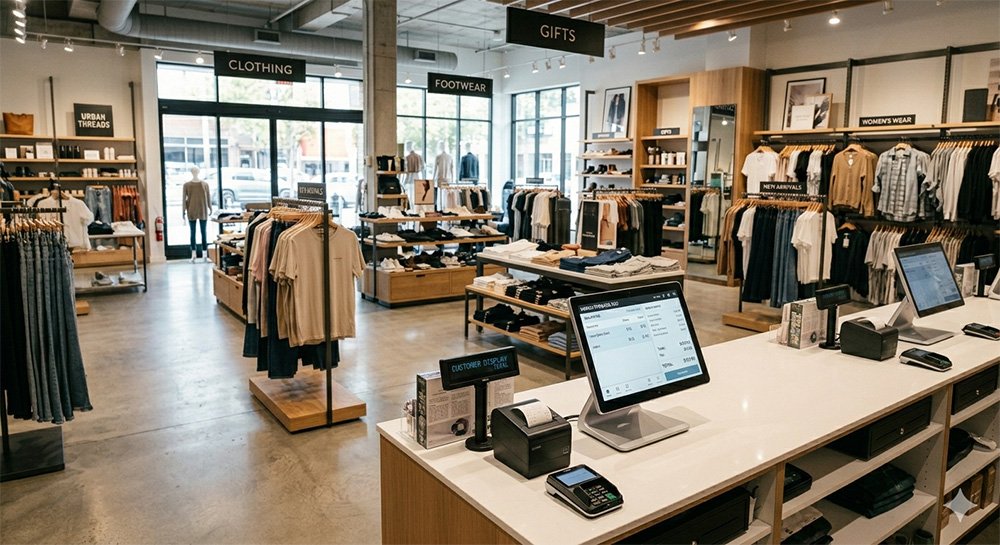
Running a retail business today requires speed, accuracy, and smart management. Whether you own a grocery store, pharmacy, restaurant, or fashion shop, handling sales manually can slow down your operations and increase mistakes.
That’s why businesses are switching to POS (Point of Sale) systems.
But what exactly is a POS system, and how does it work?
In this guide, we’ll explain everything in simple terms so you can understand how a POS system helps businesses grow faster and operate more efficiently.
What is a POS System?
A POS system is a combination of software and hardware that helps businesses process sales, manage inventory, track customers, and monitor business performance.
Simply put, it is the modern version of a cash register—but much smarter.
A POS system can:
- Generate invoices
- Track inventory
- Record sales
- Manage customers
- Accept multiple payment methods
- Create business reports
Today, most modern businesses use cloud-based POS software because it allows them to manage their business from anywhere.
How Does a POS System Work?
A POS system works by recording every transaction automatically
Here’s a simple step-by-step example:
Step 1: Add Products to the System
First, store owners add products to the POS software with:
- Product name
- Barcode
- Price
- Stock quantity
This creates a digital inventory database.
Step 2: Scan or Select Products During Sale
When a customer buys something:
- The cashier scans the barcode or selects the product
- The POS software automatically adds the item to the bill
This speeds up checkout and reduces errors.
Step 3: Calculate Total Automatically
The system instantly calculates:
- Product price
- Discounts
- Taxes
- Total amount
No manual calculation is needed.
Step 4: Accept Payment
Customers can pay using:
- Cash
- Credit/Debit cards
- Mobile banking
- Digital wallets
The POS system records the payment automatically
Step 5: Inventory Updates Automatically
Once the sale is completed:
- Stock quantity decreases automatically
- Sales records are updated in real-time
This helps business owners track inventory accurately.
Step 6: Reports & Analytics
The POS system generates useful reports like:
- Daily sales
- Monthly profit
- Best-selling products
- Employee performance
This helps business owners make smarter decisions.
Main Components of a POS System
A POS system usually includes both software and hardware.
POS Software
The software manages:
- Billing
- Inventory
- Reports
- Customer management
Cloud-based POS software is now the most popular option.
POS Hardware
Common hardware includes:
- Barcode scanner
- Receipt printer
- Cash drawer
- Touchscreen monitor
Some businesses also use tablets or mobile devices as POS terminals.
Benefits of Using a POS System
Faster Billing
POS systems reduce checkout time and improve customer experience.
Better Inventory Control
Track stock in real-time and avoid shortages or overstocking.
Accurate Reporting
Understand your business performance using detailed reports.
Reduced Human Errors
Automated calculations reduce billing mistakes.
Multi-Store Management
Manage multiple branches from one dashboard.
Customer Loyalty
Store customer information and offer personalized promotions.
Cloud POS vs Traditional POS
Traditional POS
- Installed on local computers
- Requires manual backups
- Limited remote access
Cloud POS
- Accessible from anywhere
- Automatic backups
- Real-time synchronization
- Easier updates and maintenance
Most modern businesses now prefer cloud-based POS systems because they are more flexible and scalable.
Who Needs a POS System?
POS systems are ideal for:
- Retail stores
- Grocery shops
- Restaurants
- Pharmacies
- Fashion stores
- Super shops
- Small businesses
Whether you are starting a small shop or managing multiple outlets, a POS system can help simplify operations.
How to Choose the Right POS System
Before choosing a POS system, consider:
- Ease of use
- Inventory features
- Reporting tools
- Cloud access
- Customer support
- Pricing
The right POS system should match your business size and future growth plans.
Why Businesses Are Switching to POS Systems
Manual business management creates problems like:
- Slow billing
- Stock confusion
- Calculation errors
- Missing records
A POS system solves these problems by automating daily operations.
Businesses that use POS software often experience:
- Faster service
- Better customer satisfaction
- Improved efficiency
- Higher profits
A POS system is no longer just a billing tool—it’s a complete business management solution.
From inventory tracking to sales reports and customer management, POS software helps businesses operate smarter and grow faster.
If you want to improve efficiency, reduce mistakes, and scale your business, investing in a modern POS system is one of the best decisions you can make.